Fampay APP

FamPay app guide covering features, UPI, cards, safety, download, login, payments, rewards, and everything you need to know.
FamPay App – Complete Guide to FamPay and FamApp
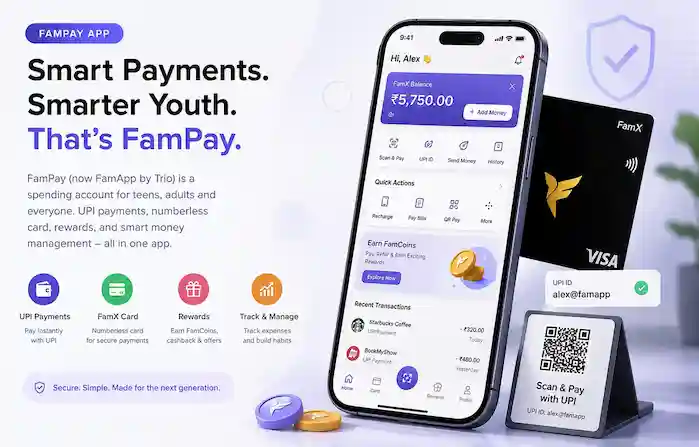
If you are searching for FamPay, the FamPay app, or wondering what is FamPay, you are in the right place. FamPay became known for bringing digital payments and card-based spending to the next generation in India. Today, the product is presented as FamApp by Trio, formerly FamPay, with its current offering centered around FamX, a spending account designed for teens, adults, and other eligible users.
FamApp combines everyday spending features with UPI and card payments. The official website currently highlights personalized UPI IDs, FamX cards, expense tracking, budgeting, QR payments, bill payments, recharges, rewards, and other payment-related features.
This guide explains what FamPay is, how the app works, its main features, safety considerations, card and UPI options, and where to find useful information about downloading and using the service.
What Is FamPay?
FamPay is the name many users still use when referring to the financial app now branded as FamApp by Trio. The company describes FamApp as a platform focused on financial inclusion and says that its FamX spending account helps users manage spending, saving, earning, and learning about money.
The service originally became well known for providing teenagers with access to digital payments and a numberless card. Over time, the product has evolved, and the current official website presents FamX as a spending account for teens, adults, and everyone, with an age eligibility starting at 11 according to the current site.
In simple terms, when people search for “FamPay kya hai”, they are generally looking for an explanation of the app and its payment ecosystem. FamApp is designed to bring several everyday money-management and payment functions into one application.
How Does the FamPay App Work?
The basic idea is to give eligible users a dedicated environment for managing everyday spending and making digital payments.
Depending on the features available to an account, users can use their spending account for payments, access a customized UPI ID, use a card, track expenses, and manage their spending. The current FamApp website also highlights fingerprint or Face ID authentication for quick payments.
The general experience can be understood in four steps:
- Create and verify an account according to the current onboarding requirements.
- Set up the available spending and payment features.
- Make payments through UPI, QR codes, card payments, or other supported options.
- Track and manage spending through the app.
Exact features and eligibility can change as the service develops, so users should always check the latest information available through the official FamApp channels.
Key Features of FamPay
FamX Spending Account
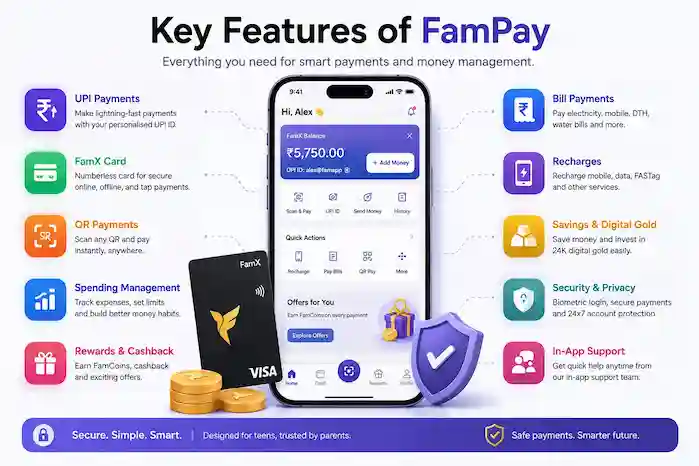
One of the current core offerings is FamX, which the official website describes as a spending account. It is positioned as an account for managing everyday spending and includes access to payment and money-management features within the app.
The official site currently describes FamX as an account that can help users save, spend, earn, and learn about money.
Personalized UPI ID
FamApp provides users with a customized UPI ID for supported payments. This allows users to make digital payments without relying solely on traditional cash transactions.
The current product page specifically highlights customized UPI IDs and Scan & Pay functionality.
UPI and QR Payments
UPI is an important part of the current FamApp experience. Users can scan QR codes and make payments through their customized UPI setup.
The official website also states that users can recharge, pay bills, and shop online through the app.
FamX Card
The current FamApp website highlights a numberless FamX card with Tap & Pay functionality. It also promotes customizable doodle designs for the card.
The numberless-card concept was an important part of the original FamPay product. FamPay’s historical product material explains that card details were kept inside the app rather than printed on the physical card, while device authentication helped protect access to those details.
Because card products and eligibility can change, users should check the current official card terms before applying.
Expense Tracking and Budgeting
Managing spending is another important part of the current product. FamApp says users can track, manage, and budget their expenses through their spending account. This can be useful for people who want to keep everyday spending separate and understand where their money is going.
Rewards, Cashback and Offers
FamX also promotes rewards and benefits on eligible spending. The current website mentions cashback, FamCoins, discounts, offers, giveaways, and other promotional benefits.
Rewards can depend on the applicable offer, membership, transaction, or terms at the time, so users should check the conditions before assuming that a particular reward will apply.
Bill Payments and Recharges
The current FamApp website lists mobile recharges, bill payments, online shopping, and other everyday transactions among its supported activities. Having these functions together can make the app useful beyond simple peer-to-peer payments.
Payment Security
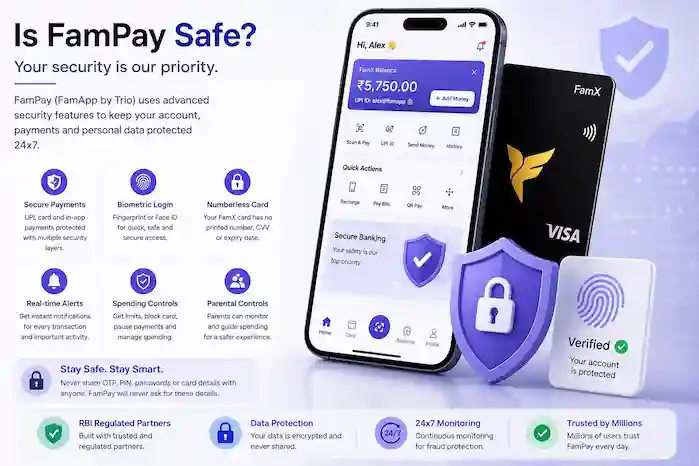
Security is especially important when using any financial application. FamPay’s historical security information described measures including device authentication and a numberless card design. The current FamApp website also promotes fingerprint and Face ID authentication for quick payments.
Users should still follow basic security practices: never share OTPs, PINs, passwords, card credentials, or verification codes with someone claiming to be support.
Is FamPay Safe?
If you search “is FamPay safe”, the answer should not simply be yes or no. Safety depends on the service’s current security systems as well as how users protect their own accounts.
FamPay’s historical product information states that it worked with an RBI-regulated entity for relevant payment services and described security measures around its prepaid account and card.
The original FamCard was designed without card numbers printed on the physical card, with card details accessible through the app. FamPay also described the ability to pause or block the card and protect card information with device-level authentication.
However, users should not treat any financial app as completely risk-free. Always:
- Download apps from trusted sources.
- Keep your phone and app updated.
- Use device security such as a PIN or biometric lock.
- Never share OTPs or payment credentials.
- Verify customer-support contacts.
- Be careful with unexpected referral, cashback, or prize messages.
- Report suspicious activity through legitimate support channels.
For a more detailed guide, see our Is FamPay Safe page.
Who Can Use FamPay?
FamPay was originally strongly associated with teenagers and their parents. The current FamApp website has broadened its positioning and currently describes the spending account as being for teens, adults, and everyone, with the site stating that accounts are available for users aged 11 and above. Eligibility, verification, product access, and individual features can depend on current requirements. Users should therefore review the latest onboarding information before creating an account or applying for a particular product.
FamPay Download
People searching for FamPay download, FamPay APK, or FamPay app download should first identify the legitimate current distribution channel.
The safest approach is to use the official app distribution options provided by FamApp rather than downloading an unknown APK from an unverified website. Third-party APK files can be modified, outdated, or potentially unsafe.
If you are specifically looking for installation instructions, app availability, version information, or APK-related guidance, visit our dedicated FamPay Download page.
FamPay Login
After setting up an account, users may search for FamPay login when they need help accessing their account.
If you are having trouble signing in, first check your internet connection, make sure you are using the correct registered information, and ensure the application is updated. Avoid entering account credentials into websites or applications that are not verified.
For detailed troubleshooting, visit our FamPay Login guide.
FamPay Card
The FamPay card, historically known as FamCard and now associated with the current FamX offering, has been one of the most recognizable parts of the product.
The original FamCard was introduced as a numberless prepaid card for teenagers, with card information stored inside the app. Historical official material also describes its use across supported RuPay merchants and digital payments.
The current FamApp website highlights a numberless FamX card, Tap & Pay, secure payments, and customizable doodle designs. Because product terms and availability may change, users should check the latest official information before ordering a card.
FamPay and Financial Independence
One reason FamPay became popular among younger users was its focus on teaching responsible spending while providing access to digital payments.
Historical FamPay material emphasized expense tracking, spending limits, savings habits, and financial education for teenagers.
The broader idea remains relevant: giving users a way to make everyday payments while learning how to manage money can help turn routine transactions into practical financial lessons.
For parents, spending visibility and controls can also be useful where those features are available under the current product setup.
FamPay Customer Care and Support
Financial apps sometimes require support for payment failures, account access, card issues, verification, or other problems.
FamApp’s current website says its support team is available 24×7 and provides a way for users to contact support. If you are looking for a FamPay customer care number, do not rely on random numbers published on social media or third-party websites. Always verify contact information through an official source.
You can also visit our dedicated FamPay Customer Care guide for support-related information.
Common FamPay Problems
Some users may encounter problems while using a payment application. Common situations include:
- Login or account-access problems
- OTP or verification issues
- Failed UPI payments
- Card payment problems
- App installation issues
- Account verification questions
- Missing or delayed rewards
- Questions about card availability
- Suspicious messages or payment requests
The right solution depends on the specific problem. When money is involved, avoid following instructions from an unverified person claiming to represent customer support.
How to Use FamPay Responsibly
A payment app is most useful when users understand the basics of digital financial safety.
Keep your account information private and use strong device security. Before making a payment, verify the recipient and amount. Do not approve an unexpected payment request simply because someone says it is required to receive money.
For younger users, learning to distinguish between sending money and receiving money, understanding transaction confirmations, and checking payment details before approval are valuable habits.
Parents can also help younger users understand spending limits, account security, and responsible digital-payment behavior.
FamPay Frequently Asked Questions
What is FamPay?
FamPay is the former name associated with the product now presented as FamApp by Trio. The current service focuses on spending accounts, UPI, card payments, and money-management features. Is FamPay still available?
The brand has evolved into FamApp by Trio, which officially describes itself as formerly FamPay.
What is FamPay used for?
FamApp can be used for supported everyday payment activities such as UPI payments, QR payments, card payments, recharges, bill payments, and expense management.
Is FamPay safe?
The service has described multiple security measures over time, including device authentication and a numberless card design. Users should still follow standard financial-security practices and use only verified channels.
Does FamPay have a card?
The current FamApp website highlights the FamX numberless card, including Tap & Pay and customizable designs.
Can I make UPI payments with FamPay?
The current FamApp website explicitly promotes customized UPI IDs and Scan & Pay functionality.
Where can I download FamPay?
Users should use legitimate, verified app-distribution channels rather than unknown APK websites. See our FamPay Download guide for detailed information.
How do I contact FamPay support?
The current official website provides access to its support team and states that support is active 24×7. Always verify support details through official channels.
Final Thoughts
FamPay has evolved from the product that originally introduced many Indian teenagers to digital payments into what is now presented as FamApp by Trio. The current offering centers around FamX, with UPI, card payments, spending management, rewards, bill payments, recharges, and other everyday financial features.
If you are researching FamPay, understanding the difference between the old FamPay branding and the current FamApp identity is an important first step. From there, you can explore specific topics such as downloading the app, logging in, using the card, checking support options, understanding safety, and learning how the payment features work.
For the safest experience, always verify current product information through legitimate sources and protect your account details just as you would with any financial service.
